:mannotop manno的博客 – 第 4 页

GO编程模式:嵌入和委托

嵌入

在Go语言中,我们可以很方便的把一个结构体给嵌到另一个结构体中。如下所示:

type Widget struct {
    X, Y int
}
type Label struct {
    Widget        // Embedding (delegation)
    Text   string // Aggregation
    X int //duplicate param name
}

在 Label 结构体里出现了重名,就需要解决重名,例如,如果 成员 X 重名,用 label.X表明 是自己的X ,用  label.Wedget.X 表示嵌入过来的。

label := Label{Widget{10, 10}, "State:",20}

label.X = 20
label.Widget.X = 10

有了这样的嵌入,就可以像UI组件一样的在结构构的设计上进行层层分解。比如,我可以新出来两个结构体 Button 和 ListBox

type Button struct {
    Label // Embedding (delegation)
}

type ListBox struct {
    Widget          // Embedding (delegation)
    Texts  []string // Aggregation
    Index  int      // Aggregation
}

方法重写

定义两个接口 Painter 用于把组件画出来,Clicker 用于表明点击事件:

type Painter interface {
    Paint()
}
 
type Clicker interface {
    Click()
}

当然,

  • 对于 Lable 来说,只有 Painter ,没有Clicker
  • 对于 Button 和 ListBox来说,Painter 和Clicker都有。

下面是一些实现:

func (label Label) Paint() {
  fmt.Printf("Label.Paint(%q)\n", label.Text)
}

//因为这个接口可以通过 Label 的嵌入带到新的结构体,
//所以,可以在 Button 中可以重载这个接口方法
func (button Button) Paint() { // Override
    fmt.Printf("Button.Paint(%s)\n", button.Text)
}
func (button Button) Click() {
    fmt.Printf("Button.Click(%s)\n", button.Text)
}


func (listBox ListBox) Paint() {
    fmt.Printf("ListBox.Paint(%q)\n", listBox.Texts)
}
func (listBox ListBox) Click() {
    fmt.Printf("ListBox.Click(%q)\n", listBox.Texts)
}

这里,需要重点说明一下,Button.Paint() 接口可以通过 Label 的嵌入带到新的结构体,如果 Button.Paint() 不实现的话,会调用 Label.Paint() ,所以,在 Button 中声明 Paint() 方法,相当于Override

通过下面的程序可以看到,整个多态是怎么执行的:

label := Label{Widget{10, 10}, "State:",20}
button1 := Button{Label{Widget{10, 70}, "OK"}}
button2 := NewButton(50, 70, "Cancel")
listBox := ListBox{Widget{10, 40}, 
    []string{"AL", "AK", "AZ", "AR"}, 0}

for _, painter := range []Painter{label, listBox, button1, button2} {
    painter.Paint()
    fmt.Println() // print a empty line 
}

/*output:
Label.Paint("State:")

ListBox.Paint(["AL" "AK" "AZ" "AR"]) *override label's Paint*

Button.Paint(OK) *override label's Paint*

Button.Paint(Cancel) *override label's Paint*
*/
 
for _, widget := range []interface{}{label, listBox, button1, button2} {
  widget.(Painter).Paint()
  if clicker, ok := widget.(Clicker); ok {
    clicker.Click()
  }
  //call embed's method
  if embedLabel, ok := widget.(Button); ok {
    embedLabel.Label.Paint()
  }
  fmt.Println() // print a empty line 
}

/*output:
Label.Paint("State:")

ListBox.Paint(["AL" "AK" "AZ" "AR"]) *override label's Paint*
ListBox.Click(["AL" "AK" "AZ" "AR"]) *implement Click*

Button.Paint(OK) *override label's Paint*
Button.Click(OK) *implement Click*
Label.Paint("OK") *call embed's method*

Button.Paint(Cancel) *override label's Paint*
Button.Click(Cancel) *implement Click*
Label.Paint("Cancel") *call embed's method*
*/

GO编程模式:反转控制

有一个开关要控制一个灯的开和关这两个动作,最常见也是最没有技术含量的实现会是这个样子:

然后,有一天,我们发现需要对灯泡扩展一下,于是我们做了个抽象类:

但是,如果有一天,我们发现这个开关可能还要控制别的不单单是灯泡的东西,我们就发现这个开关耦合了灯泡这种类别,非常不利于我们的扩展,于是反转控制出现了。

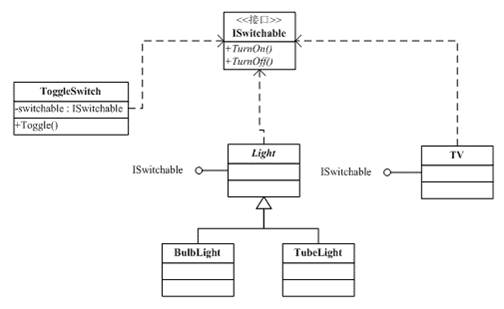
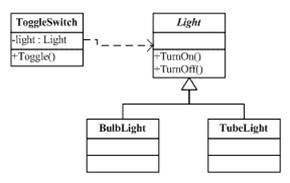
就像现实世界一样,造开关的工厂根本不关心要控制的东西是什么,它只做一个开关应该做好的事,就是把电接通,把电断开(不管是手动的,还是声控的,还是光控,还是遥控的),而我们的造各种各样的灯泡(不管是日光灯,白炽灯)的工厂也不关心你用什么样的开关,反正我只管把灯的电源接口给做出来,然后,开关厂和电灯厂依赖于一个标准的通电和断电的接口。于是产生了IoC控制反转,如下图:

所谓控制反转的意思是,开关从以前的设备的专用开关,转变到了控制电源的开关,而以前的设备要反过来依赖于开关厂声明的电源连接接口。只要符合开关厂定义的电源连接的接口,这个开关可以控制所有符合这个电源连接接口的设备也就是说,开关从依赖设备这种情况,变成了,设备反过来依赖于开关所定义的接口

反转控制IoC – Inversion of Control 是一种软件设计的方法,其主要的思想是把控制逻辑与业务逻辑分享,不要在业务逻辑里写控制逻辑,这样会让控制逻辑依赖于业务逻辑,而是反过来,让业务逻辑依赖控制逻辑。与这个开关和电灯的示例一样,开关是控制逻辑,电器是业务逻辑,不要在电器中实现开关,而是把开关抽象成一种协议,让电器都依赖之。这样的编程方式可以有效的降低程序复杂度,并提升代码重用

比如有一个存放整数的数据结构,如下所示:

type IntSet struct {
    data map[int]bool
}
func NewIntSet() IntSet {
    return IntSet{make(map[int]bool)}
}
func (set *IntSet) Add(x int) {
    set.data[x] = true
}
func (set *IntSet) Delete(x int) {
    delete(set.data, x)
}
func (set *IntSet) Contains(x int) bool {
    return set.data[x]
}

其中实现了 Add() 、Delete() 和 Contains() 三个操作,前两个是写操作,后一个是读操作。

现在我们想实现一个 Undo 的功能。我们可以把把 IntSet 再包装一下变成 UndoableIntSet 代码如下所示:

type UndoableIntSet struct { // Poor style
    IntSet    // Embedding (delegation)
    functions []func()
}
 
func NewUndoableIntSet() UndoableIntSet {
    return UndoableIntSet{NewIntSet(), nil}
}
 

func (set *UndoableIntSet) Add(x int) { // Override
    if !set.Contains(x) {
        set.data[x] = true
        set.functions = append(set.functions, func() { set.Delete(x) })
    } else {
        set.functions = append(set.functions, nil)
    }
}


func (set *UndoableIntSet) Delete(x int) { // Override
    if set.Contains(x) {
        delete(set.data, x)
        set.functions = append(set.functions, func() { set.Add(x) })
    } else {
        set.functions = append(set.functions, nil)
    }
}

func (set *UndoableIntSet) Undo() error {
    if len(set.functions) == 0 {
        return errors.New("No functions to undo")
    }
    index := len(set.functions) - 1
    if function := set.functions[index]; function != nil {
        function()
        set.functions[index] = nil // For garbage collection
    }
    set.functions = set.functions[:index]
    return nil
}

在上面的代码中,我们可以看到

  • 我们在 UndoableIntSet 中嵌入了IntSet ,然后Override了 它的 Add()和 Delete() 方法。
  • Contains() 方法没有Override,所以,会被带到 UndoableInSet 中来了。
  • 在Override的 Add()中,记录 Delete 操作
  • 在Override的 Delete() 中,记录 Add 操作
  • 在新加入 Undo() 中进行Undo操作。

通过这样的方式来为已有的代码扩展新的功能是一个很好的选择,这样,可以在重用原有代码功能和重新新的功能中达到一个平衡。但是,这种方式最大的问题是,Undo操作其实是一种控制逻辑,并不是业务逻辑,所以,在复用 Undo这个功能上是有问题。因为其中加入了大量跟 IntSet 相关的业务逻辑

通过反转依赖实现反转控制

现在我们来看另一种方法:

我们先声明一种函数接口,表现我们的Undo控制可以接受的函数签名是什么样的:

type Undo []func()

然后,我们在我们的IntSet里嵌入 Undo,然后,再在 Add() 和 Delete() 里使用上面的方法,就可以完成功能。

type IntSet struct {
    data map[int]bool
    undo Undo
}
 
func NewIntSet() IntSet {
    return IntSet{data: make(map[int]bool)}
}

func (set *IntSet) Undo() error {
    return set.undo.Undo()
}
 
func (set *IntSet) Contains(x int) bool {
    return set.data[x]
}

func (set *IntSet) Add(x int) {
    if !set.Contains(x) {
        set.data[x] = true
        set.undo.Add(func() { set.Delete(x) })
    } else {
        set.undo.Add(nil)
    }
}
 
func (set *IntSet) Delete(x int) {
    if set.Contains(x) {
        delete(set.data, x)
        set.undo.Add(func() { set.Add(x) })
    } else {
        set.undo.Add(nil)
    }
}

可以看见在这次实现中,不再由 控制逻辑 Undo 来依赖业务逻辑 IntSet,而是由业务逻辑 IntSet 来依赖 Undo ,这个就是控制反转。

其依赖的是其实是一个协议,这个协议是一个没有参数的函数数组。我们也可以看到,我们 Undo 的代码就可以复用了

GO编程模式:装饰器模式

Go语言的修饰器编程模式,其实也是函数式编程的一种形式,这种模式很容易的可以把一些函数装配到另外一些函数上,可以让你的代码更为的简单,也可以让一些“小功能型”的代码复用性更高,让代码中的函数可以像乐高玩具那样自由地拼装。

不过,目前版本Go(最新1.20)语言的“糖”不多,而且又是强类型的静态无虚拟机的语言,所以,无法做到像 Java 和 Python 那样的优雅的修饰器的代码。

示例

package main

import "fmt"

func decorator(f func(s string)) func(s string) {

    return func(s string) {
        fmt.Println("Started")
        f(s)
        fmt.Println("Done")
    }
}

func Hello(s string) {
    fmt.Println(s)
}

func main() {
        decorator(Hello)("Hello, World!")
}

这段代码中动用了一个高阶函数 decorator(),在调用的时候,先把 Hello() 函数传进去,然后其返回一个匿名函数,这个匿名函数中除了运行了自己的代码,也调用了被传入的 Hello() 函数。

这个玩法和 Python 的异曲同工,只不过,有些遗憾的是,Go 并不支持像 Python 那样的 @decorator 语法糖。所以,在调用上有些难看。当然,如果你要想让代码容易读一些,你可以这样:

hello := decorator(Hello)
hello("Hello")

多个修饰器的 Pipeline

再来看一个处理 HTTP 请求的相关的例子:

package main

import (
    "fmt"
    "log"
    "net/http"
    "strings"
)

func WithServerHeader(h http.HandlerFunc) http.HandlerFunc {
    return func(w http.ResponseWriter, r *http.Request) {
        log.Println("--->WithServerHeader()")
        w.Header().Set("Server", "HelloServer v0.0.1")
        h(w, r)
    }
}

func hello(w http.ResponseWriter, r *http.Request) {
    log.Printf("Recieved Request %s from %s\n", r.URL.Path, r.RemoteAddr)
    fmt.Fprintf(w, "Hello, World! "+r.URL.Path)
}

func main() {
    http.HandleFunc("/v1/hello", WithServerHeader(hello))
    err := http.ListenAndServe(":8080", nil)
    if err != nil {
        log.Fatal("ListenAndServe: ", err)
    }
}

上面代码中使用到了修饰模式,WithServerHeader() 函数就是一个 Decorator,其传入一个 http.HandlerFunc,然后返回一个改写的版本。上面的例子还是比较简单,用 WithServerHeader() 就可以加入一个 Response 的 Header。

于是,这样的函数我们可以写出好些个。如下所示,有写 HTTP 响应头的,有写认证 Cookie 的,有检查认证Cookie的,有打日志的……

package main

import (
    "fmt"
    "log"
    "net/http"
    "strings"
)

func WithServerHeader(h http.HandlerFunc) http.HandlerFunc {
    return func(w http.ResponseWriter, r *http.Request) {
        log.Println("--->WithServerHeader()")
        w.Header().Set("Server", "HelloServer v0.0.1")
        h(w, r)
    }
}

func WithAuthCookie(h http.HandlerFunc) http.HandlerFunc {
    return func(w http.ResponseWriter, r *http.Request) {
        log.Println("--->WithAuthCookie()")
        cookie := &http.Cookie{Name: "Auth", Value: "Pass", Path: "/"}
        http.SetCookie(w, cookie)
        h(w, r)
    }
}

func WithBasicAuth(h http.HandlerFunc) http.HandlerFunc {
    return func(w http.ResponseWriter, r *http.Request) {
        log.Println("--->WithBasicAuth()")
        cookie, err := r.Cookie("Auth")
        if err != nil || cookie.Value != "Pass" {
            w.WriteHeader(http.StatusForbidden)
            return
        }
        h(w, r)
    }
}

func WithDebugLog(h http.HandlerFunc) http.HandlerFunc {
    return func(w http.ResponseWriter, r *http.Request) {
        log.Println("--->WithDebugLog")
        r.ParseForm()
        log.Println(r.Form)
        log.Println("path", r.URL.Path)
        log.Println("scheme", r.URL.Scheme)
        log.Println(r.Form["url_long"])
        for k, v := range r.Form {
            log.Println("key:", k)
            log.Println("val:", strings.Join(v, ""))
        }
        h(w, r)
    }
}
func hello(w http.ResponseWriter, r *http.Request) {
    log.Printf("Recieved Request %s from %s\n", r.URL.Path, r.RemoteAddr)
    fmt.Fprintf(w, "Hello, World! "+r.URL.Path)
}

func main() {
    http.HandleFunc("/v1/hello", WithServerHeader(WithAuthCookie(hello)))
    http.HandleFunc("/v2/hello", WithServerHeader(WithBasicAuth(hello)))
    http.HandleFunc("/v3/hello", WithServerHeader(WithBasicAuth(WithDebugLog(hello))))
    err := http.ListenAndServe(":8080", nil)
    if err != nil {
        log.Fatal("ListenAndServe: ", err)
    }
}

在使用上,需要对函数一层层的套起来,看上去好像不是很好看,如果需要 decorator 比较多的话,代码会比较难看了。嗯,我们可以重构一下。

是不是很眼熟?没错,可以像函数式编程那样,写一个带有可变decorator参数的工具函数——用来遍历并调用各个 decorator

type HttpHandlerDecorator func(http.HandlerFunc) http.HandlerFunc

func Handler(h http.HandlerFunc, decors ...HttpHandlerDecorator) http.HandlerFunc {
    for i := range decors {
        d := decors[len(decors)-1-i] // iterate in reverse
        h = d(h)
    }
    return h
}

然后使用就会变得优雅很多:

http.HandleFunc("/v4/hello", Handler(hello,
                WithServerHeader, WithBasicAuth, WithDebugLog,.....,...))

泛型的修饰器

不过,对于 Go 的修饰器模式,还有一个小问题 —— 好像无法做到泛型,就像上面那个计算时间的函数一样,其代码耦合了需要被修饰的函数的接口类型,无法做到非常通用,如果这个事解决不了,那么,这个修饰器模式还是有点不好用的。

因为 Go 语言不像 Python 和 Java,Python是动态语言,而 Java 有语言虚拟机,所以他们可以干好些比较变态的事,然而 Go 语言是一个静态的语言,这意味着其类型需要在编译时就要搞定,否则无法编译。不过,Go 语言支持的最大的泛型是 interface{} 还有比较简单的 reflection 机制,应该是可实现的。

func Decorator(decoPtr, fn interface{}) (err error) {
    var decoratedFunc, targetFunc reflect.Value

    decoratedFunc = reflect.ValueOf(decoPtr).Elem()
    targetFunc = reflect.ValueOf(fn)

    v := reflect.MakeFunc(targetFunc.Type(),
            func(in []reflect.Value) (out []reflect.Value) {
                fmt.Println("before")
                out = targetFunc.Call(in)
                fmt.Println("after")
                return
            })

    decoratedFunc.Set(v)
    return
}

上面的代码动用了 reflect.MakeFunc() 函数制出了一个新的函数其中的 targetFunc.Call(in) 调用了被修饰的函数。

上面这个 Decorator() 需要两个参数,

  • 第一个是出参 decoPtr ,就是完成修饰后的函数
  • 第二个是入参 fn ,就是需要修饰的函数

使用例子,首先假设我们有两个需要修饰的函数:

func foo(a, b, c int) int {
    fmt.Printf("%d, %d, %d \n", a, b, c)
    return a + b + c
}

func bar(a, b string) string {
    fmt.Printf("%s, %s \n", a, b)
    return a + b
}

使用:

type MyFoo func(int, int, int) int
var myfoo MyFoo
Decorator(&myfoo, foo)
myfoo(1, 2, 3)

使用 Decorator() 时,还需要先声明一个函数签名,感觉好傻啊。一点都不泛型,不是吗?

嗯。如果不想声明函数签名,那么你也可以这样

mybar := bar
Decorator(&mybar, bar)
mybar("hello,", "world!")

GO编程模式:函数式编程

在编程中,会经常性的需要对一个对象(或是业务实体)进行相关的配置。比如下面这个业务实体:

type Server struct {

Addr string

Port int

Protocol string

Timeout time.Duration

MaxConns int

TLS *tls.Config

}

在这个 Server 对象中,我们可以看到:

  • 要有侦听的IP地址 Addr 和端口号 Port ,这两个配置选项是必填的(当然,IP地址和端口号都可以有默认值,当这里我们用于举例认为是没有默认值,而且不能为空,需要必填的)。
  • 然后,还有协议 Protocol 、 Timeout 和MaxConns 字段,这几个字段是不能为空的,但是有默认值的,比如:协议是tcp, 超时30秒 和 最大链接数1024个。
  • 还有一个 TLS 这个是安全链接,需要配置相关的证书和私钥。这个是可以为空的。

所以,针对于上述这样的配置,我们需要有多种不同的创建不同配置 Server 的函数签名,如下所示(代码比较宽,需要左右滚动浏览):

func NewDefaultServer(addr string, port int) (*Server, error) {

return &Server{addr, port, "tcp", 30 * time.Second, 100, nil}, nil

}

func NewTLSServer(addr string, port int, tls *tls.Config) (*Server, error) {

return &Server{addr, port, "tcp", 30 * time.Second, 100, tls}, nil

}

func NewServerWithTimeout(addr string, port int, timeout time.Duration) (*Server, error) {

return &Server{addr, port, "tcp", timeout, 100, nil}, nil

}

func NewTLSServerWithMaxConnAndTimeout(addr string, port int, maxconns int, timeout time.Duration, tls *tls.Config) (*Server, error) {

return &Server{addr, port, "tcp", 30 * time.Second, maxconns, tls}, nil

}

因为Go语言不支持重载函数,所以,你得用不同的函数名来应对不同的配置选项。

配置对象方案

要解决这个问题,最常见的方式是使用一个配置对象,如下所示:

type Config struct {

Protocol string

Timeout time.Duration

Maxconns int

TLS *tls.Config

}

我们把那些非必输的选项都移到一个结构体里,于是 Server 对象变成了:

type Server struct {

Addr string

Port int

Conf *Config

}

于是,我们只需要一个 NewServer() 的函数了,在使用前需要构造 Config 对象。

func NewServer(addr string, port int, conf *Config) (*Server, error) {

if conf == nil{
//new conf etc....
}

//set value

}

//Using the default configuratrion

srv1, _ := NewServer("localhost", 9000, nil)

conf := ServerConfig{Protocol:"tcp", Timeout: 60*time.Duration}

srv2, _ := NewServer("locahost", 9000, &conf)

这段代码虽然不错,但是,能看到其中有一点不好的是,Config 并不是必需的,还需要判断是否是 nil 或是 Empty – Config{}这让代码感觉还是有点不是很干净。

Builder模式

当然,我们可以把上面代码改写成如下的代码:

//使用一个builder类来做包装
type ServerBuilder struct {
  Server
}

func (sb *ServerBuilder) Create(addr string, port int) *ServerBuilder {
  sb.Server.Addr = addr
  sb.Server.Port = port
  //其它代码设置其它成员的默认值
  return sb
}

func (sb *ServerBuilder) WithProtocol(protocol string) *ServerBuilder {
  sb.Server.Protocol = protocol 
  return sb
}

func (sb *ServerBuilder) WithMaxConn( maxconn int) *ServerBuilder {
  sb.Server.MaxConns = maxconn
  return sb
}

func (sb *ServerBuilder) WithTimeOut( timeout time.Duration) *ServerBuilder {
  sb.Server.Timeout = timeout
  return sb
}

func (sb *ServerBuilder) WithTLS( tls *tls.Config) *ServerBuilder {
  sb.Server.TLS = tls
  return sb
}

func (sb *ServerBuilder) Build() (Server) {
  return  sb.Server
}

于是就可以以如下的方式来使用了:

sb := ServerBuilder{}
server, err := sb.Create("127.0.0.1", 8080).
  WithProtocol("udp").
  WithMaxConn(1024).
  WithTimeOut(30*time.Second).
  Build()

这样的方式也很清楚,不需要额外的Config类,使用链式的函数调用的方式来构造一个对象,只需要多加一个Builder类,这个Builder类似乎有点多余,感觉也可以直接在Server 上进行这样的 Builder 构造,但是在处理错误的时候可能就有点麻烦(需要为Server结构增加一个error 成员,破坏了Server结构体的“纯洁”),不如一个包装类更好一些。

那么,如果想省掉这个包装的结构体,那么就轮到我们的Functional Options上场了,函数式编程。

Functional Options

首先,我们先定义一个函数类型:

type Option func(*Server)

然后,我们可以使用函数式的方式定义一组如下的函数:

func Protocol(p string) Option {
    return func(s *Server) {
        s.Protocol = p
    }
}
func Timeout(timeout time.Duration) Option {
    return func(s *Server) {
        s.Timeout = timeout
    }
}
func MaxConns(maxconns int) Option {
    return func(s *Server) {
        s.MaxConns = maxconns
    }
}
func TLS(tls *tls.Config) Option {
    return func(s *Server) {
        s.TLS = tls
    }
}

再定一个 NewServer()的函数,其中,有一个可变参数 options 其可以传出多个上面上的函数,然后使用一个for-loop来调用这些函数设置我们的 Server 对象。

func NewServer(addr string, port int, options ...func(*Server)) (*Server, error) {

  srv := Server{
    Addr:     addr,
    Port:     port,
    Protocol: "tcp",
    Timeout:  30 * time.Second,
    MaxConns: 1000,
    TLS:      nil,
  }
  for _, option := range options {
    option(&srv)
  }
  //...
  return &srv, nil
}

于是,创建对象的时候就可以这样使用:

s1, _ := NewServer("localhost", 1024)
s2, _ := NewServer("localhost", 2048, Protocol("udp"))
s3, _ := NewServer("0.0.0.0", 8080, Timeout(300*time.Second), MaxConns(1000))

所以,以后,大家在要玩类似的代码时,强烈推荐使用Functional Options这种方式,这种方式至少带来了如下的好处:

  • 直觉式的编程
  • 高度的可配置化
  • 很容易维护和扩展
  • 自文档
  • 容易上手
  • 没有什么容易遗漏的事(判空)

Protobuf IDL

protobuf协议是跨语言跨平台的序列化协议。

protobuf本身并不是和gRPC绑定的。它也可以被用于非RPC场景,如存储等

json xml都是一种序列化的方式,只是他们不需要提前预定义idl,且具备可读性,当然他们传输的体积也因此较大,可以说是各有优劣

protobuf最新版本为proto3,使用方式参考官方文档

Manage Child Goroutines With context.Context

context.Context

As described in official Go documentation,context.Context carries deadlines, cancelation signals, and other scoped values across boundaries and between processes.

Basic usage

Context represents scope or the lifetime of the attached goroutines. When you see a function signature that looks like the following:

// Task is a function that can be and should be run as goroutine,
// it can be cancelled by cancelling the input context.
func Task(context.Context, ...args interface{})

It means that you can use the function as following:

func main() {
    // Create a new context being cancelled in 5 seconds.
    ctx, _ := context.WithTimeout(context.Background(), 5 * time.Second)
    // Start a new goroutine whose lifetime's attached to ctx.
    go task(ctx, args...)
}

The above code means that if the task function lasts over 5 seconds, it will be canceled, which helps avoid leaking goroutines.

You should design your own API in the manner shown above. When you have some long-running functions, consider attaching their lifetime to the context.

Create and derive context

To create a new and empty context, use:

// Create a new, empty, and unexecuted context.
context.Background()

Contexts can be derived, child contexts are complete once parent context is finished.

func main() {
    // Create a new context.
    parent, cancelParent := context.WithCancel(context.Background())
    // Derive child contexts from parent.
    childA, _ := context.WithTimeout(parent, 5 * time.Secound)
    childB, _ := context.WithDeadline(parent, time.Now().Add(1 * time.Minute)
    go func() {
        <-childA.Done()
        <-childB.Done()
        fmt.Println("All children are done")
    }()
    // Cancel parent make all children are cancelled.
    cancelParent()
}
// -> Result: All children are done
  • context.WithCancel(parentContext) creates a new context which completes when the returned cancel function is called or when the parent’s context finishes, whichever happens first.
  • context.WithTimeout(contextContext, 5 * time.Second) creates a new context which finishes when the returned cancel function is called or when it exceeds timeout or when the parent’s context finishes, whichever happens first.
  • context.WithDeadline(parentContext, time.Now().Add(1 * time.Minute) creates a new context which finishes when the returned cancel function deadline expires or when the parent’s context completes, whichever happens first.

There are some other methods to derive context. Check out here for further details.

Manage Child Goroutines

Now’s let solve a real-world common problem with context.Context.

The following is a very common use case in concurrency programming:

“You have 2 tasks A and B. Your main goroutine forks N goroutines (workers) running task A and M goroutines (workers) running task B. How do you gracefully shut down all child tasks when your main goroutine finished (e.g. user requests to close application)?”

package main

import (
	"context"
	"fmt"
	"os"
	"os/signal"
)

func taskA(ctx context.Context, index int) {
	done := false
	go func() {
		// Keep doing something.
		for i := 0; !done; i++ {
			fmt.Printf("A%d%d\n", index, i)
		}
	}()

	// Wait util context is cancelled.
	<-ctx.Done()
	// Turn on closing flag.
	done = true
}

func taskB(ctx context.Context, index int) {
loop:
	for i := 0; ; i++ {
		select {
		// Try pushing some message to some channel.
		case someChannel <- fmt.Sprintf("B%d%d\n", index, i):
			continue loop
			// Or when context is cancelled, finish the task.
		case <-ctx.Done():
			break loop
		}
	}
}

func main() {
	// Create application context.
	ctx, cancel := context.WithCancel(context.Background())

	// Fork n of task A with application context.
	for i := 0; i < N; i++ {
		go taskA(ctx, i)
	}

	// Fork m of task B with application context.
	for i := 0; i < M; i++ {
		go taskB(ctx, i)
	}

	// Wait for SIGINT.
	sig := make(chan os.Signal, 1)
	signal.Notify(sig, os.Interrupt)
	<-sig

	// Shutdown. Cancel application context will kill all attached tasks.
	cancel()
}

Use Go Channels as Promises and Async/Await

Promise And Async/Await in other languages

If you’ve ever programmed with Javascript, you definitely know about Promise and async/awaitC#Java, Python, and some other programming languages apply the same pattern but with other names such as Task or Future.

On the contrary, Go doesn’t follow the pattern at all. Instead, it introduces goroutines and channels. However, it isn’t difficult to replicate the pattern with goroutines and channels.

Single async/await

//javascript

const longRunningTask = async () => {
    // Simulate a workload.
    sleep(3000)
    return Math.floor(Math.random() * Math.floor(100))
}

const r = await longRunningTask()
console.log(r)
package main

import (
	"fmt"
        "math/rand"
	"time"
)

//golang

func longRunningTask() <-chan int32 {
	r := make(chan int32)

	go func() {
		defer close(r)
		
		// Simulate a workload.
		time.Sleep(time.Second * 3)
		r <- rand.Int31n(100)
	}()

	return r
}

func main() {
	r := <-longRunningTask()
	fmt.Println(r)
}

To declare an “async” function in Go:

  • The return type is <-chan ReturnType.
  • Within the function, create a channel by make(chan ReturnType) and return the created channel at the end of the function.
  • Start an anonymous goroutine by go func() {...} and implement the function’s logic inside that anonymous function.
  • Return the result by sending the value to channel.
  • At the beginning of the anonymous function, add defer close(r) to close the channel once done.

To “await” the result, simply read the value from channel by v := <- fn().

Promise.all()

It’s very common that we start multiple async tasks then wait for all of them to finish and gather their results. Doing that is quite simple in both Javascript and Golang.

//javascript

const longRunningTask = async () => {
    // Simulate a workload.
    sleep(3000)
    return Math.floor(Math.random() * Math.floor(100))
}

const [a, b, c] = await Promise.all(longRunningTask(), longRunningTask(), longRunningTask())
console.log(a, b, c)
package main

import (
	"fmt"
        "math/rand"
	"time"
)

//golang

func longRunningTask() <-chan int32 {
	r := make(chan int32)

	go func() {
		defer close(r)
		
		// Simulate a workload.
		time.Sleep(time.Second * 3)
		r <- rand.Int31n(100)
	}()

	return r
}

func main() {
	aCh, bCh, cCh := longRunningTask(), longRunningTask(), longRunningTask()
	a, b, c := <-aCh, <-bCh, <-cCh
	
	fmt.Println(a, b, c)
}

In Golang, we have to do it in 2 lines of code and introduce 3 more variables, but it’s clean and simple enough.

We can not do <-longRun(), <-longRun(), <-longRun(), which will longRun() one by one instead all in once.

Promise.race()

Sometimes, a piece of data can be received from several sources to avoid high latencies, or there’re cases that multiple results are generated but they’re equivalent and the only first response is consumed. This first-response-win pattern, therefore, is quite popular. Achieving that in both Javascript and Go is very simple.

//javascript

const one = async () => {
    // Simulate a workload.
    sleep(Math.floor(Math.random() * Math.floor(2000)))
    return 1
}

const two = async () => {
    // Simulate a workload.
    sleep(Math.floor(Math.random() * Math.floor(1000)))
    sleep(Math.floor(Math.random() * Math.floor(1000)))
    return 2
}

const r = await Promise.race(one(), two())
console.log(r)
package main

import (
	"fmt"
	"math/rand"
	"time"
)

//golang

func one() <-chan int32 {
	r := make(chan int32)

	go func() {
		defer close(r)

		// Simulate a workload.
		time.Sleep(time.Millisecond * time.Duration(rand.Int63n(2000)))
		r <- 1
	}()

	return r
}

func two() <-chan int32 {
	r := make(chan int32)

	go func() {
		defer close(r)

		// Simulate a workload.
		time.Sleep(time.Millisecond * time.Duration(rand.Int63n(1000)))
		time.Sleep(time.Millisecond * time.Duration(rand.Int63n(1000)))
		r <- 2
	}()

	return r
}

func main() {
	var r int32
	select {
	case r = <-one():
	case r = <-two():
	}

	fmt.Println(r)
}

select-case is the pattern that Go designed specifically for racing channel operations. We can even do more stuff within each case, but we’re focusing only on the result so we just leave them all empty.

Promise.then() and Promise.catch()

Because Go’s error propagation model is very different from Javascript, there’s any clean way to replicate Promise.then() and Promise.catch(). In Go, error is returned along with return values instead of being thrown as exception. Therefore, if your function can fail, you can consider changing your return <-chan ReturnType into <-chan ReturnAndErrorType, which is a struct holding both the result and error.

Go style Promise&then

type Promise struct {
    wg  sync.WaitGroup
    res string
    err error
}

func NewPromise(f func() (string, error)) *Promise {
    p := &Promise{}
    p.wg.Add(1)
    go func() {
        p.res, p.err = f()
        p.wg.Done()
    }()
    return p
}

func (p *Promise) Then(r func(string), e func(error)) {
    go func() {
        p.wg.Wait()
        if p.err != nil {
            e(p.err)
            return
        }
        r(p.res)
    }()
}

策略模式+工厂方法消除if else

假设需求为,根据不同勋章类型,处理相对应的勋章服务,优化前有以下代码:

    String medalType = "guest";
    if ("guest".equals(medalType)) {
        System.out.println("嘉宾勋章");
     } else if ("vip".equals(medalType)) {
        System.out.println("会员勋章");
    } else if ("guard".equals(medalType)) {
        System.out.println("展示守护勋章");
    }
    ...

首先,我们把每个条件逻辑代码块,抽象成一个公共的接口,可以得出以下代码:

//勋章接口
public interface IMedalService {
    void showMedal();
}
//守护勋章策略实现类
public class GuardMedalServiceImpl implements IMedalService {
    @Override
    public void showMedal() {
        System.out.println("展示守护勋章");
    }
}
//嘉宾勋章策略实现类
public class GuestMedalServiceImpl implements IMedalService {
    @Override
    public void showMedal() {
        System.out.println("嘉宾勋章");
    }
}
//VIP勋章策略实现类
public class VipMedalServiceImpl implements IMedalService {
    @Override
    public void showMedal() {
        System.out.println("会员勋章");
    }
}

接下来,我们再定义策略工厂类,用来管理这些勋章实现策略类,如下:

//勋章服务工产类
public class MedalServicesFactory {

    private static final Map<String, IMedalService> map = new HashMap<>();
    static {
        map.put("guard", new GuardMedalServiceImpl());
        map.put("vip", new VipMedalServiceImpl());
        map.put("guest", new GuestMedalServiceImpl());
    }
    public static IMedalService getMedalService(String medalType) {
        return map.get(medalType);
    }
}

使用了策略+工厂模式之后,代码变得简洁多了,使用如下:

public class Test {
    public static void main(String[] args) {
        String medalType = "guest";
        IMedalService medalService = MedalServicesFactory.getMedalService(medalType);
        medalService.showMedal();
    }
}

Golang可以通过直接将function作为map的类型来实现,不用再定义工厂。

Cache Refresh Best Pratice

更新缓存的Design Pattern有四种:Cache aside, Read / Write through, Write behind caching,我们下面一一来看一下这四种Pattern。

Cache Aside Pattern

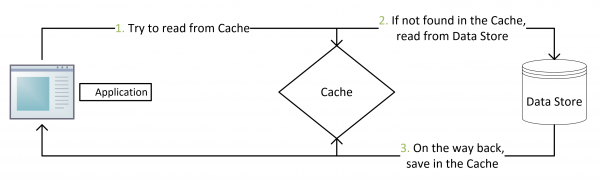
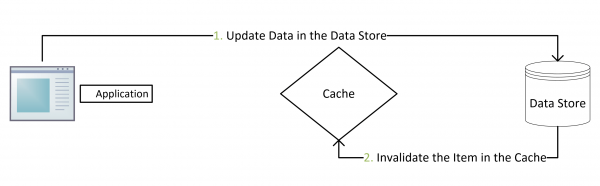
这是最常用最常用的pattern了。其具体逻辑如下:

  • 失效:应用程序先从cache取数据,没有得到,则从数据库中取数据,成功后,放到缓存中。
  • 命中:应用程序从cache中取数据,取到后返回。
  • 更新:先把数据存到数据库中,成功后,再让缓存失效。

注意,我们的更新是先更新数据库,成功后,让缓存失效。那么,这种方式是否可以没有文章前面提到过的那个问题呢?我们可以脑补一下。

一个是查询操作,一个是更新操作的并发,首先,没有了删除cache数据的操作了,而是先更新了数据库中的数据,此时,缓存依然有效,所以,并发的查询操作拿的是没有更新的数据,但是,更新操作马上让缓存的失效了,后续的查询操作再把数据从数据库中拉出来。而不会像文章开头的那个逻辑产生的问题,后续的查询操作一直都在取老的数据。

这是标准的design pattern,包括Facebook的论文《Scaling Memcache at Facebook》也使用了这个策略。为什么不是写完数据库后更新缓存?你可以看一下Quora上的这个问答《Why does Facebook use delete to remove the key-value pair in Memcached instead of updating the Memcached during write request to the backend?》,主要是怕两个并发的写操作导致脏数据。

那么,是不是Cache Aside这个就不会有并发问题了?不是的,比如,一个是读操作,但是没有命中缓存,然后就到数据库中取数据,此时来了一个写操作,写完数据库后,让缓存失效,然后,之前的那个读操作再把老的数据放进去,所以,会造成脏数据。

但,这个case理论上会出现,不过,实际上出现的概率可能非常低,因为这个条件需要发生在读缓存时缓存失效,而且并发着有一个写操作。而实际上数据库的写操作会比读操作慢得多,而且还要锁表,而读操作必需在写操作前进入数据库操作,而又要晚于写操作更新缓存,所有的这些条件都具备的概率基本并不大。

所以,这也就是Quora上的那个答案里说的,要么通过2PC或是Paxos协议保证一致性,要么就是拼命的降低并发时脏数据的概率,而Facebook使用了这个降低概率的玩法,因为2PC太慢,而Paxos太复杂。当然,最好还是为缓存设置上过期时间。

Read/Write Through Pattern

我们可以看到,在上面的Cache Aside套路中,我们的应用代码需要维护两个数据存储,一个是缓存(Cache),一个是数据库(Repository)。所以,应用程序比较啰嗦。而Read/Write Through套路是把更新数据库(Repository)的操作由缓存自己代理了,所以,对于应用层来说,就简单很多了。可以理解为,应用认为后端就是一个单一的存储,而存储自己维护自己的Cache。

Read Through

Read Through 套路就是在查询操作中更新缓存,也就是说,当缓存失效的时候(过期或LRU换出),Cache Aside是由调用方负责把数据加载入缓存,而Read Through则用缓存服务自己来加载,从而对应用方是透明的。

Write Through

Write Through 套路和Read Through相仿,不过是在更新数据时发生。当有数据更新的时候,如果没有命中缓存,直接更新数据库,然后返回。如果命中了缓存,则更新缓存,然后再由Cache自己更新数据库(这是一个同步操作)

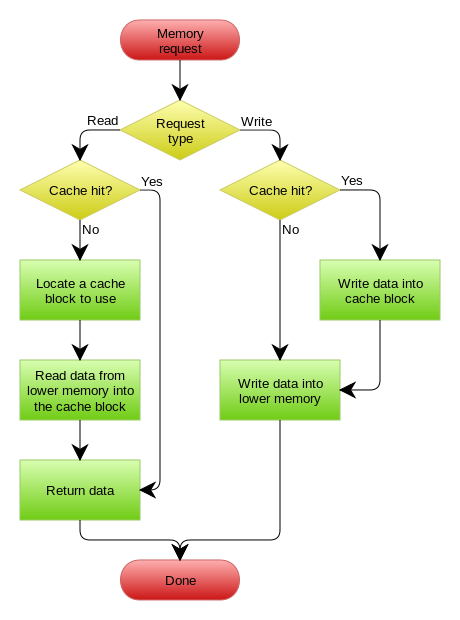
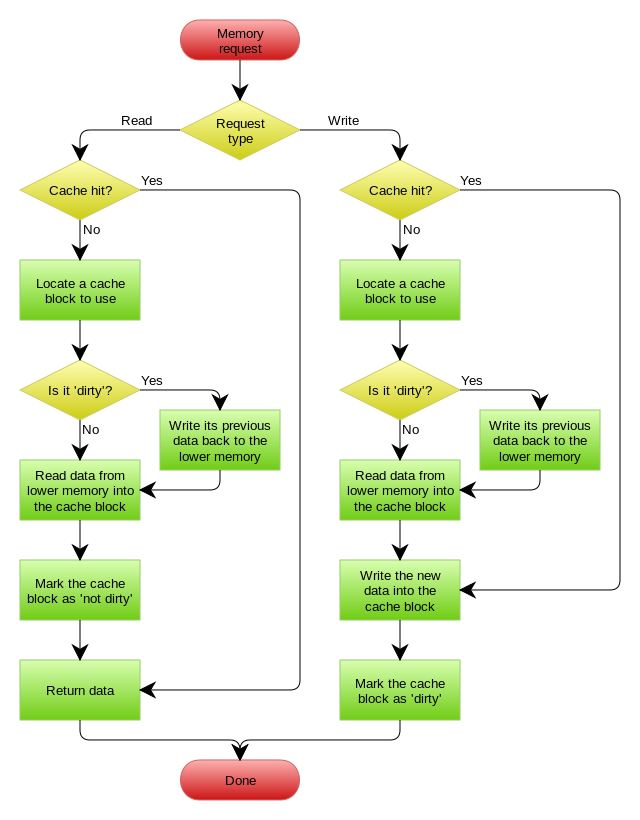
下图自来Wikipedia的Cache词条。其中的Memory你可以理解为就是我们例子里的数据库。

Write Behind Caching Pattern(Write Back)

Write Behind 又叫 Write Back。一些了解Linux操作系统内核的同学对write back应该非常熟悉,这不就是Linux文件系统的Page Cache的算法吗?是的,你看基础这玩意全都是相通的。所以,基础很重要,我已经不是一次说过基础很重要这事了。

Write Back套路,一句说就是,在更新数据的时候,只更新缓存,不更新数据库,而我们的缓存会异步地批量更新数据库。这个设计的好处就是让数据的I/O操作飞快无比(因为直接操作内存嘛 ),因为异步,write back还可以合并对同一个数据的多次操作,所以性能的提高是相当可观的。

但是,其带来的问题是,数据不是强一致性的,而且可能会丢失(我们知道Unix/Linux非正常关机会导致数据丢失,就是因为这个事)。在软件设计上,我们基本上不可能做出一个没有缺陷的设计,就像算法设计中的时间换空间,空间换时间一个道理,有时候,强一致性和高性能,高可用和高性性是有冲突的。软件设计从来都是取舍Trade-Off。

另外,Write Back实现逻辑比较复杂,因为他需要track有哪数据是被更新了的,需要刷到持久层上。操作系统的write back会在仅当这个cache需要失效的时候,才会被真正持久起来,比如,内存不够了,或是进程退出了等情况,这又叫lazy write。

在wikipedia上有一张write back的流程图,基本逻辑如下:

1)上面讲的这些Design Pattern,其实并不是软件架构里的mysql数据库和memcache/redis的更新策略,这些东西都是计算机体系结构里的设计,比如CPU的缓存,硬盘文件系统中的缓存,硬盘上的缓存,数据库中的缓存。基本上来说,这些缓存更新的设计模式都是非常老古董的,而且历经长时间考验的策略,所以这也就是,工程学上所谓的Best Practice,遵从就好了。

2)有时候,我们觉得能做宏观的系统架构的人一定是很有经验的,其实,宏观系统架构中的很多设计都来源于这些微观的东西。比如,云计算中的很多虚拟化技术的原理,和传统的虚拟内存不是很像么?Unix下的那些I/O模型,也放大到了架构里的同步异步的模型,还有Unix发明的管道不就是数据流式计算架构吗?TCP的好些设计也用在不同系统间的通讯中,仔细看看这些微观层面,你会发现有很多设计都非常精妙……所以,请允许我在这里放句观点鲜明的话——如果你要做好架构,首先你得把计算机体系结构以及很多老古董的基础技术吃透了

3)在软件开发或设计中,我非常建议在之前先去参考一下已有的设计和思路,看看相应的guideline,best practice或design pattern,吃透了已有的这些东西,再决定是否要重新发明轮子。千万不要似是而非地,想当然的做软件设计。

4)上面,我们没有考虑缓存(Cache)和持久层(Repository)的整体事务的问题。比如,更新Cache成功,更新数据库失败了怎么吗?或是反过来。关于这个事,如果你需要强一致性,你需要使用“两阶段提交协议”——prepare, commit/rollback,比如Java 7 的XAResource,还有MySQL 5.7的 XA Transaction,有些cache也支持XA,比如EhCache。当然,XA这样的强一致性的玩法会导致性能下降,关于分布式的事务的相关话题,你可以看看《分布式系统的事务处理》一文。

docker概念和应用

docker的提出

传统的kvm通过创建虚拟机的方式来部署多个业务程序,虽然它解决了物理机所不能解决的环境隔离、应用迁移问题,但也带来了大量的硬件资源消耗,因为不同的业务程序所需的资源不同,而每一个虚拟机都是一个完整的操作系统,粒度太重,要分配大量的系统资源,因此,为了高效利用硬件资源,粒度更轻的容器技术诞生了。

*发展历程:物理机——VM(虚拟机)——KVM(虚拟化技术)——容器化技术(Docker)

docker的诞生

Docker公司位于旧金山,原名dotcloud,底层利用了Linux内核支持的容器技术LXC是为了更方便地创建和管理这些容器而开发的一套工具

Docker由Golang编写,基于Linux内核的Cgroups、Namespace、以及Union FS等技术对进程进行环境隔离,是属于操作系统层面的虚拟化技术。

  • 环境隔离:指进程空间、网络空间、文件系统空间独立
  • 被隔离的进程独立于宿主机以及其它隔离的进程,称为容器
  • 容器化的最大优势就是保持轻量级的同时实现了VM一样的环境隔离功能
  • Docker是开源的容器引擎,可以方便地对容器进行管理,最初的Docker是基于LXC的,后转而使用该公司自行开发的LibContainer

容器的特点:

  • 是镜像的实例化
  • 随处运行:容器可以将代码与配置文件和相关依赖库进行打包,从而确保在任何环境下的运行都是一致的。
  • 高资源利用率:容器提供进程级的隔离,因此可以更加精细地设置CPU和内存的使用率,进而更好地利用服务器的计算资源。
  • 快速扩展:每个容器都可作为单独的进程予以运行,并且可以共享底层操作系统的系统资源,这样一来可以加快容器的启动和停止效率。

镜像:包含容器所要运行的程序本身及其依赖、配置项、脚本等一切所需环境和配置

使用docker后的开发—部署流程

开发人员:

  • 编写业务项目程序的本体代码
  • 编写dockerfile,包含shell部署逻辑、项目的运行环境配置、启动程序。
  • docker根据dockerfile构建镜像

测试/运维人员:无需再了解项目的具体配置环境,直接使用开发交付的镜像创建容器实例

总体流程:发布源码-构建镜像-发布镜像-创建容器进程-创建容器实例(源码+镜像=实例)

Docker容器是与系统其他部分隔离开的一系列进程,运行这些进程所需的所有文件都由另一个镜像提供,从开发到测试再到生产的整个过程中,Linux 容器都具有可移植性和一致性。相对于依赖重复传统测试环境的开发渠道,容器的运行速度要快得多,并且支持在多种主流云平台(PaaS)和本地系统上部署。

容器彻底解决了开发、测试、生产等不同环境下环境不一致、环境迁移难、环境部署难的问题

镜像内容只有发行版及其依赖,与宿主机公用内核,相比于虚拟机非常轻量级

Dockerfile

Dockerfile是用来描述文件的构成的文本文档,其中包含了用户可以在使用行调用以组合Image的所有命令,用户还可以使用Docker build实现连续执行多个命令指今行的自动构建。

通过编写Dockerfile生磁镜像,可以为开发、测试团队提供基本一致的环境,从而提升开发、测试团队的效率,不用再为环境不统一而发愁,同时运维也能更加方便地管理我们的镜像。

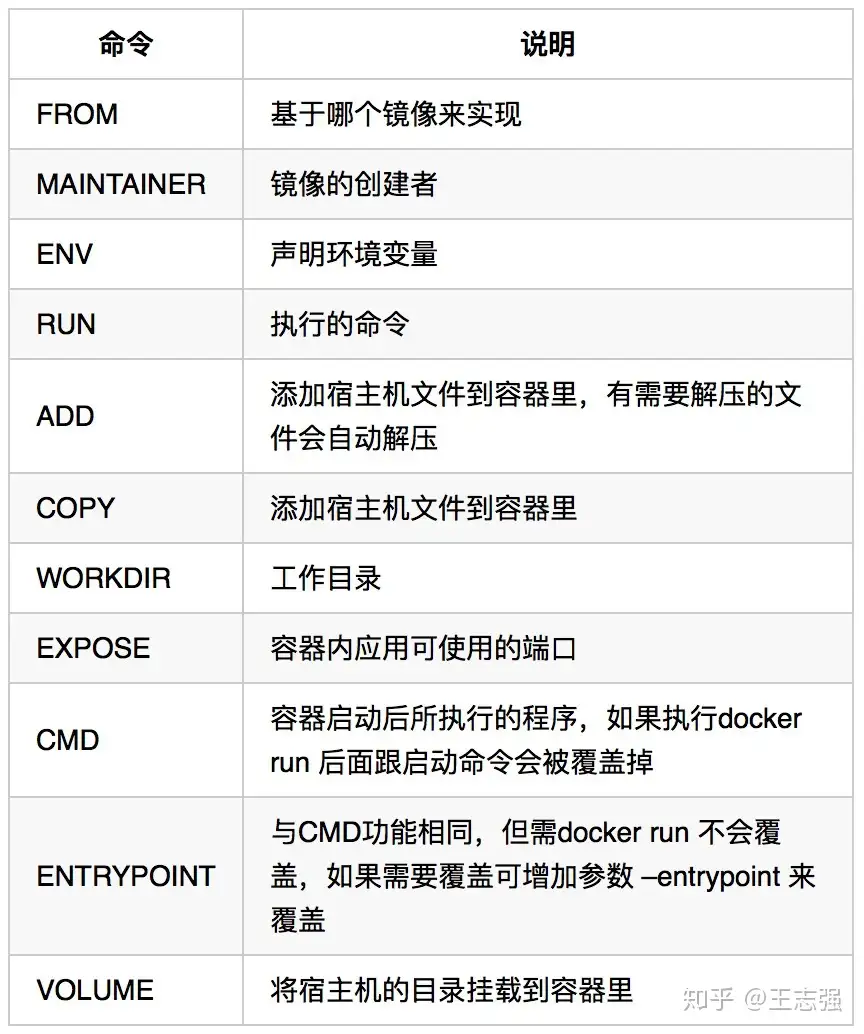
Dockerfile的语法非常简单,常用的只有11个:

编写优雅的Dockerfile主要需要注意以下几点:

  • Dockerfile文件不宜过长,层级越多最终制作出来的镜像也就越大。
  • 构建出来的镜像不要包含不需要的内容,如日志、安装临时文件等。
  • 尽量使用运行时的基础镜像,不需要将构建时的过程也放到运行时的Dockerfile里。

只要记住以上三点就能写出不错的Dockerfile。

为了方便大家了解,我们用两个Dockerfile实例进行简单的对比:

FROM ubuntu:16.04
RUN apt-get update
RUN apt-get install -y apt-utils libjpeg-dev \     
python-pip
RUN pip install --upgrade pip
RUN easy_install -U setuptools
RUN apt-get clean
FROM ubuntu:16.04
RUN apt-get update && apt-get install -y apt-utils \
  libjpeg-dev python-pip \
           && pip install --upgrade pip \
      && easy_install -U setuptools \
    && apt-get clean

我们看第一个Dockerfile,乍一看条理清晰,结构合理,似乎还不错。再看第二个Dockerfile,紧凑,不易阅读,为什么要这么写?

  • 第一个Dockerfile的好处是:当正在执行的过程某一层出错,对其进行修正后再次Build,前面已经执行完成的层不会再次执行。这样能大大减少下次Build的时间,而它的问题就是会因层级变多了而使镜像占用的空间也变大。
  • 第二个Dockerfile把所有的组件全部在一层解决,这样做能一定程度上减少镜像的占用空间,但在制作基础镜像的时候若其中某个组编译出错,修正后再次Build就相当于重头再来了,前面编译好的组件在一个层里,得全部都重新编译一遍,比较消耗时间。
  • 注意,若Dockerfile非常长的话可以考虑减少层次,因为Dockerfile最高只能有127层。

*多阶构建(了解)

在多阶构建出来之前,传统方式是使用单个文件进行构建,单文件就是将所有的构建过程(包括项目的依赖、编译、测试、打包过程)全部包含在一个Dockerfile中之下:

FROM golang:1.11.4-alpine3.8 AS build-env
ENV GO111MODULE=off
ENV GO15VENDOREXPERIMENT=1
ENV BUILDPATH=github.com/lattecake/hello
RUN mkdir -p /go/src/${BUILDPATH}
COPY ./ /go/src/${BUILDPATH}
RUN cd /go/src/${BUILDPATH} && CGO_ENABLED=0 GOOS=linux GOARCH=amd64 go install –v

CMD [/go/bin/hello]

这种的做法会带来一些问题:

  • Dockerfile文件会特别长,当需要的东西越来越多的时候可维护性指数级将会下降;
  • 镜像层次过多,镜像的体积会逐步增大,部署也会变得越来越慢;
  • 代码存在泄漏风险。

以Golang为例,它运行时不依赖任何环境,只需要有一个编译环境,那这个编译环境在实际运行时是没有任务作用的,编译完成后,那些源码和编译器已经没有任务用处了也就没必要留在镜像里。

多文件构建(多阶构建前的解决方案)

多文件构建,其实就是使用多个Dockerfile,然后通过脚本将它们进行组合。假设有三个文件分别是:Dockerfile.run、Dockerfile.build、build.sh

  • Dockerfile.run就是运行时程序所必须需要的一些组件的Dockerfile,它包含了最精简的库;
  • Dockerfile.build只是用来构建,构建完就没用了;
  • build.sh的功能就是将Dockerfile.run和Dockerfile.build进行组成,把Dockerfile.build构建好的东西拿出来,然后再执行Dockerfile.run,算是一个调度的角色。

Dockerfile.build

FROM golang:1.11.4-alpine3.8 AS build-env
ENV GO111MODULE=off
ENV GO15VENDOREXPERIMENT=1
ENV BUILDPATH=github.com/lattecake/hello
RUN mkdir -p /go/src/${BUILDPATH}
COPY ./ /go/src/${BUILDPATH}
RUN cd /go/src/${BUILDPATH} && CGO_ENABLED=0 GOOS=linux GOARCH=amd64 go install –v

Dockerfile.run

FROM alpine:latest
RUN apk –no-cache add ca-certificates
WORKDIR /root
ADD hello .
CMD ["./hello"]

Build.sh

#!/bin/sh
docker build -t –rm hello:build . -f Dockerfile.build
docker create –name extract hello:build
docker cp extract:/go/bin/hello ./hello
docker rm -f extract
docker build –no-cache -t –rm hello:run . -f Dockerfile.run
rm -rf ./hello

执行build.sh完成项目的构建。

多文件构建大大减小了镜像的占用空间,但它有三个文件需要管理,维护成本也更高一些。

多阶构建

完成多阶段构建我们只需要在Dockerfile中多次使用FORM声明,每次FROM指令可以使用不同的基础镜像,并且每次FROM指令都会开始新的构建,我们可以选择将一个阶段的构建结果复制到另一个阶段,在最终的镜像中只会留下最后一次构建的结果,这样就可以很容易地解决前面提到的问题,并且只需要编写一个Dockerfile文件。这里值得注意的是:需要确保Docker的版本在17.05及以上。下面我们来说说具体操作。

在Dockerfile里可以使用as来为某一阶段取一个别名”build-env”:

FROM golang:1.11.2-alpine3.8 AS build-env

然后从上一阶段的镜像中复制文件,也可以复制任意镜像中的文件:

COPY –from=build-env /go/bin/hello /usr/bin/hello

看一个简单的例子:

FROM golang:1.11.4-alpine3.8 AS build-env
 
ENV GO111MODULE=off
ENV GO15VENDOREXPERIMENT=1
ENV GITPATH=github.com/lattecake/hello
RUN mkdir -p /go/src/${GITPATH}
COPY ./ /go/src/${GITPATH}
RUN cd /go/src/${GITPATH} && CGO_ENABLED=0 GOOS=linux GOARCH=amd64 go install -v
 
FROM alpine:latest
ENV apk –no-cache add ca-certificates
COPY --from=build-env /go/bin/hello /root/hello
WORKDIR /root
CMD ["/root/hello"]

执行docker build -t –rm hello3 .后再执行docker images 

安装使用